All Video Downloader & Browser
- 3.9
- Rating
- 50.00M
- Installs
- Free
- Price

 Analysis by App-foxy
I usually judge a downloader by what happens between spotting a useful clip and actually having a clean copy ready to view or share. That is where Video Downloader - Story Saver earns its place. It is a free Android app in the Video Players & Editors category from Fast Video Downloader & Story Saver - DevBay, built around saving videos and photos and reposting them when the source allows it. I found it most useful as a quick handoff tool: find something in a social app, pass the source to the downloader, save the media, and then move it into the next part of my workflow.
The app has a 3.9 average from around 649 thousand ratings and has passed 50 million installs, so it is clearly familiar to a large Android audience. Those numbers do not make every download smooth, but they do suggest that the basic idea is easy for many people to understand. It is free to start, rated Everyone, and works on Android 7.0 or later. The current version is 2.0.5, and optional purchases range from $2.99 to $24.99 per item.
From finding a clip to saving it on the phone
I find the handoff works best when I start with one specific post rather than browsing at random: choosing the individual clip or photo makes it easier to tell whether the right item has reached the downloader. I also treat the first save as a small test, checking where the file appears before building a routine around it. With that starting point in mind, the next question is how the process holds up when I use it more heavily.
You May Also Like

 Blood Strike: 2.5 Anniversary
Blood Strike’s Loadouts Turn Every Drop Into a Tactical Gamble
A close look at Blood Strike’s custom loadouts: how fast access to signature weapons reshapes its battle royale rhythm, rewards preparation, and narrows the gap between fights.

 Pandora - Music & Podcasts
Pandora’s Music Is Easy to Start, but Harder to Recover
Pandora’s strength is its low-effort path from a seed to a station. Its weak spot is how much confidence it asks you to place in connection, setup, and quiet recovery.

 8 Ball Pool
 Is Built on Rivalries, Rematches, and Routine
A close look at the rivalries, rematches, shared routines, and unanswered safety questions that turn a quick pool match into a persistent mobile community.

 Samsung Music
’s Quiet Strength Is Playing What You Already Own
Its reach comes less from spectacle than from dependable access to a personal library. That simplicity is both the app’s strongest retention engine and its ceiling.

 AccuWeather: Weather Radar
AccuWeather Review: A Quick, Clear Forecast for Everyday Decisions
For everyday plans, the best forecast is the one you can understand quickly. AccuWeather makes rain timing, radar, and local conditions easy to act on, with a few trade-offs.

 Hill Climb Racing
Why Hill Climb Racing Still Turns Crashes Into One More Run
A tiny car, a bumpy hill and one more upgrade: Hill Climb Racing keeps resurfacing because its simple chaos makes every near-miss feel personal.
More From Our News Desk



The starting condition matters more than the button
My first practical lesson was that the source determines the experience. If I already know which video or photo I want, the app can be a convenient second step. If I open it without a clear source in mind, it feels less purposeful. This is not a replacement for browsing every social platform; it is better understood as a bridge between content discovery and local storage.
A typical situation is simple. I might see a short cooking demonstration in a social feed and want to keep it for a later grocery trip, or find a photo I have permission to reuse in a private project. Rather than searching for the same post again, I use the sharing route from the original app and send the content toward Video Downloader - Story Saver. That small handoff is more reliable than trying to remember a caption, username, or search phrase later.
Before saving anything, I also ask whether I have the right to keep or repost it. The app makes downloading convenient, but convenience does not transfer ownership. For personal reference, creator-approved reuse, or media I made myself, the workflow makes sense. For someone looking for a way around private accounts, restrictions, or copyright, it is the wrong tool and the wrong expectation.
Step one: choose the source and use the share handoff
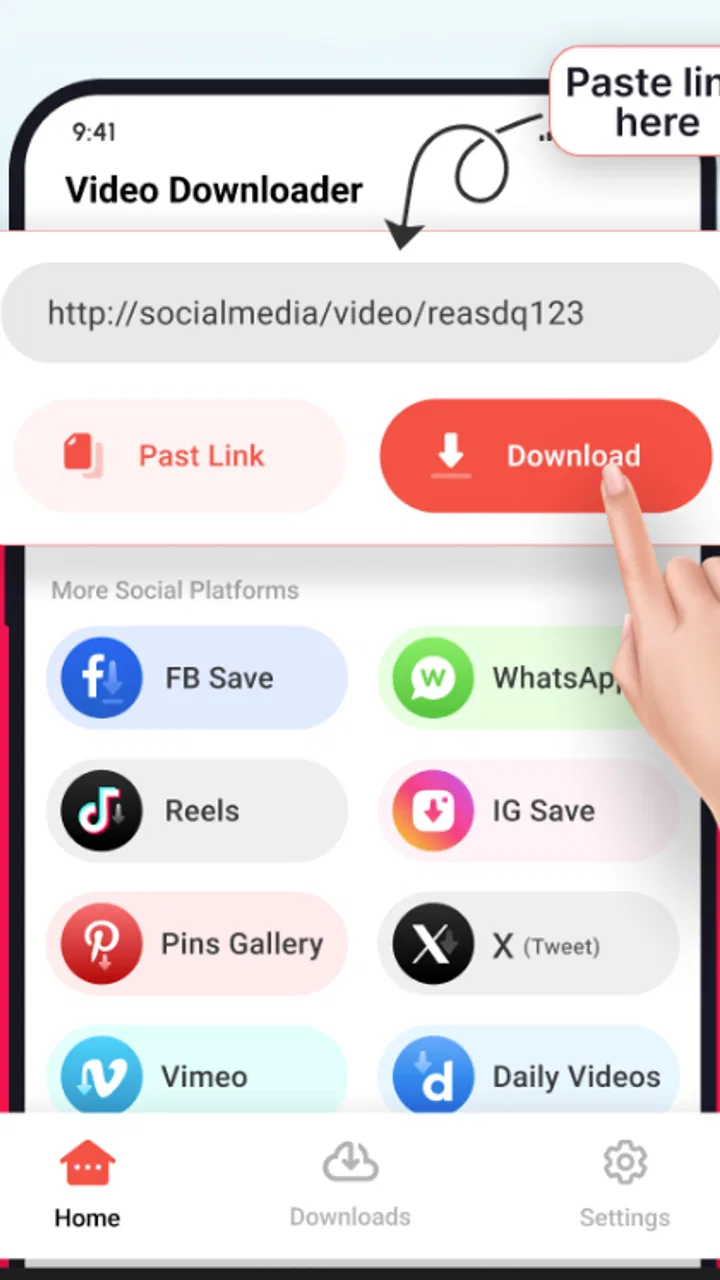
The most useful workflow starts in the app where the media appears. I locate the post, open its sharing controls, and choose the downloader if it is offered. If the source app does not present a direct handoff, I use the available copying or sharing route rather than assuming the downloader can identify every post automatically.
This is an important distinction from a full browser-based download service. A browser may let me paste a web address into a page, while this app is more naturally used alongside the Android sharing system. The benefit is speed when the source cooperates. The drawback is that the experience depends on how the original app exposes its content and whether the post is accessible outside its normal viewing context.
I would not treat a copied address as proof that the media is downloadable. Some links point to a profile, a temporary page, a login wall, or a page containing several pieces of media. In those cases, the downloader may need a more direct source. My practical tip is to share the individual post whenever possible, not a general profile link. That reduces the chance of saving the wrong item or spending time on a link the app cannot interpret cleanly.
Step two: check what is about to be saved
Once the content reaches the downloader, I slow down for a moment and verify the preview or selected item before starting the save. This sounds minor, but it prevents a common mistake: downloading a thumbnail, a repost, or a different piece of media from a page with multiple attachments.
For photos, this check is especially worthwhile because a visible image may be part of a carousel. For videos, I look for the expected opening frame and duration before committing storage space. The app’s value is not only the download action; it is the reduction of repeated searching. A wrong file defeats that benefit, so I prefer a deliberate check over tapping through the process as quickly as possible.
Another useful habit is to decide where the file belongs immediately after saving. If I am collecting reference material, I keep a small, recognizable naming routine in my phone’s gallery or file manager. If I am preparing something to repost, I separate it from personal camera photos. This is not a glamorous feature, but it makes the difference between a useful saved library and a crowded folder full of unidentified clips.
Step three: save first, repost second
I see reposting as a separate stage rather than an automatic continuation of downloading. Saving gives me a local copy for later viewing; reposting creates a new public use and brings attribution, permission, and context into the picture. Keeping those stages separate helps me review the content before publishing it elsewhere.
For example, if I save a short tutorial to watch while offline, the process ends after the file is safely available on my device. If I intend to share it with friends, I first check whether the original creator is visible and whether the destination platform will preserve that context. A downloader can move the media, but it cannot decide whether a repost is respectful or appropriate.
This separation is one of the app’s strongest practical uses. It gives me a pause between discovery and publication. I can trim my plan, add a note, or decide not to share at all. People who want a one-tap publishing system may find that pause slower, but I prefer it because it reduces careless reposts.
The handoff to Android storage and other apps
The final handoff is from the downloader to the rest of the phone. Once a file is saved, I may open it in the gallery, attach it to a message, edit it, or send it to another application. This is where the app fits naturally into Android: it does the acquisition job, while the gallery, editor, or social app handles the next task.
That division is helpful for a lightweight workflow. I do not need a full editing suite merely to keep a clip, and I do not need to return to the original feed every time I want to view it. On the other hand, anyone expecting advanced organization, detailed editing, or professional media management should think of this app as the front end of the process, not the complete studio.
I also recommend checking the gallery after the first successful save. If the file appears where I expect, future downloads are easier to locate. If it does not, I avoid repeatedly downloading the same item while searching for it. The exact experience can vary with the phone’s storage layout and the source app, so confirming the first result is a sensible one-time setup step.
What the real-world result looks like
In an everyday scenario, I might be commuting without a dependable connection and want a short instructional video available later. I find it at home, send it through the downloader, confirm the correct clip, and save it before leaving. During the commute, I open the local copy rather than loading the original feed again. The result is not dramatic, but it is practical: fewer repeated searches, less dependence on the original post remaining easy to find, and a clearer boundary between online discovery and offline viewing.
A second scenario involves a photo I have permission to use in a family event message. I save it, inspect the result, and then attach it from the gallery instead of relying on the original social post. This workflow is useful because the saved item becomes available to the phone’s ordinary sharing tools. The downloader is valuable here as a preparation step, not as the destination itself.
Where the app feels strongest is in these short, repeatable jobs. I would recommend it to someone who regularly needs to move allowed media from a social feed into local storage without learning a complicated editor. It is also a reasonable choice for users who want a dedicated place to begin the process rather than juggling a browser, a file manager, and several copying steps.
Where the flow breaks
The biggest weakness is that the app cannot control the source. A public-looking post may still require a login, use a temporary address, or expose only a page rather than the original media. When that happens, the failure can feel like an app problem even though the obstacle begins elsewhere. I found it important not to keep retrying the same link blindly; returning to the original post and using its direct sharing option is usually the more sensible next move.
Stories and short-lived posts can be more awkward than ordinary videos because their availability changes quickly. If I want to keep something, I start the process while it is still visible rather than assuming a later link will work. This is a workflow limitation worth understanding before relying on the app for time-sensitive material.
Reposting can also introduce friction. A downloaded file may not carry the same surrounding caption, creator credit, comments, or context that appeared on the original platform. If those details matter, I need to recreate them manually. That makes the app less suitable for publishers who need a complete, polished cross-platform transfer and more suitable for personal saving or carefully prepared sharing.
There is also the question of monetization. The app is free, but optional in-app purchases are listed from $2.99 to $24.99 per item. I would approach those purchases cautiously and first decide whether the free workflow already covers my needs. For occasional downloads, paying may not be worthwhile. For frequent use, a purchase could make sense only if it removes a specific annoyance that affects my routine; I would not buy simply because the app is installed.
How it compares with the usual alternatives
The most common alternative is saving content inside the original social app. That is often better when I only need a bookmark, because it preserves the post’s context and does not create another local file. The disadvantage is that I remain dependent on the platform, the account, and the post staying available. Video Downloader - Story Saver is more useful when I specifically need a copy accessible through the phone’s gallery or another app.
A browser downloader can be more flexible for pasted web addresses, especially when I am working from a desktop-style page. It can also be less comfortable on a phone, with extra tabs, redirects, or confusing download controls. This app’s advantage is the mobile handoff from the source app. Its disadvantage is that it does not magically make every web page compatible.
Screen recording is another fallback. It can capture what is visible when a normal download route fails, but the result may include interface elements, notifications, or reduced quality. It is also a poor choice when I need the original photo or a clean video file. I would use it only for material I am allowed to record and only when the direct workflow is unavailable.
A full file manager may be better for people who already understand folders, naming, and Android storage. Such tools provide more control over organization, but they do not necessarily make the initial media handoff easier. This downloader sits between a social platform and the file system, which is precisely why it appeals to casual users and may feel limited to power users.
Who should use it, and who should skip it
I think it is a good fit for Android users who regularly save permitted videos or photos from social content, want a simple route into local storage, and are comfortable checking the result before sharing it. It is especially handy for personal reference collections, creator-approved repost preparation, and offline viewing of short material that I expect to revisit.
I would skip it if my main goal is advanced video editing, automatic cataloging, cloud synchronization, or guaranteed access to restricted content. I would also avoid building an important publishing workflow around it unless I am willing to restore captions, credits, and context manually. In those cases, the original platform’s sharing tools, a dedicated editor, or a more structured media manager may be a better match.
The Everyone age rating makes the app approachable for a broad audience, but that does not remove the need for sensible sharing habits. I would explain to younger users that downloading and reposting are different actions, and that a visible post is not automatically free to reuse. The app makes the technical step easier; the judgment still belongs to the person using it.
My final take after following the complete workflow
After using it as a start-to-finish bridge, I see Video Downloader - Story Saver as a practical utility rather than a complete media platform. Its best moment is the handoff from a supported source to a saved file, followed by ordinary Android sharing or viewing. When the source is clear and accessible, the process is quick enough to become a useful habit.
Its limitations are equally clear: source compatibility controls much of the outcome, temporary or restricted posts can interrupt the flow, and reposting requires manual attention to credit and context. Those are not reasons to dismiss it, but they are reasons to use it with realistic expectations. I would install it for occasional or regular saving of media I am entitled to keep, test the free workflow first, and treat every download as the beginning of a responsible sharing decision rather than the end of one.
For that audience, the app’s free entry point, broad Android compatibility, and large existing user base make it easy to try. My recommendation is conditional but positive: use it when you need a straightforward bridge from discovery to local storage, and choose a different tool when you need editing, organization, or a fully automated publishing pipeline. The key is to judge the whole handoff, not just the download button.
FAQs for All Video Downloader & Browser
01What platforms does Video Downloader - Story Saver support?
Video Downloader - Story Saver is available on both Android and iOS platforms. It allows users to download videos and stories from various social media platforms directly to their devices. Ensure your device meets the app's system requirements for optimal performance.
02Is Video Downloader - Story Saver easy to use for beginners?
Yes, the app is designed with a user-friendly interface that makes it easy even for beginners. With simple navigation and clear instructions, users can quickly learn how to download and save videos or stories from their favorite platforms without any hassle.
03Does Video Downloader - Story Saver support multiple downloads simultaneously?
Yes, the app supports multiple downloads at once, allowing users to save time by downloading several videos or stories simultaneously. This feature ensures efficiency and convenience, especially for those who need to download large quantities of content.
04Are there any in-app purchases or ads in Video Downloader - Story Saver?
The app may contain ads to support its free version. However, there might be an option to upgrade to a premium version to remove ads and unlock additional features. Check the app’s store page for detailed information on in-app purchases and their benefits.
05Is it legal to download videos and stories using Video Downloader - Story Saver?
Downloading videos and stories using this app is subject to the terms of service of the platforms from which you are downloading. Always ensure you have permission to download content and that you are complying with copyright laws. It's crucial to respect the intellectual property rights of content creators.
Pros
- Easy to navigate interface.
- Supports multiple platforms.
- High download speed.
- No registration required.
- Allows batch downloading.
Cons
- Contains in-app ads.
- Limited formats available.
- Requires internet connection.
- No built-in media player.
- Occasional download interruptions.

All Video Downloader & Browser
Gallery